
The shift toward online education has fundamentally reshaped academic landscapes. Lectures that once occurred in physical, acoustically treated university halls or classroom spaces have migrated to digital platforms. Today, students absorb complex ideas from bedrooms, coffee shops, libraries, and busy households.
When discussing the tools required for successful online learning, the conversation almost always centers on visual elements: high-definition webcams, bright monitors, fast internet connections, and interactive software interfaces.
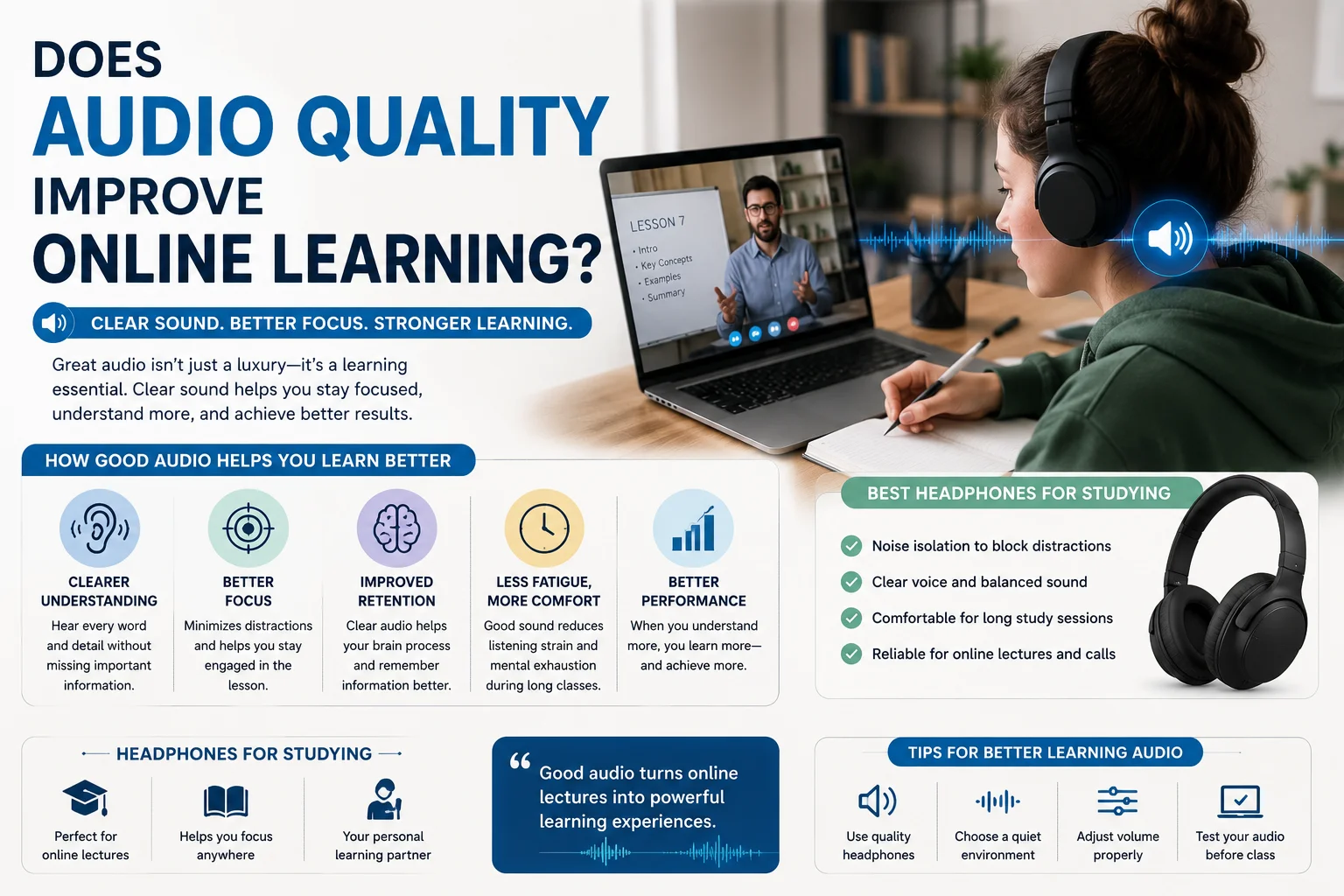
However, an invisible yet far more critical variable is frequently overlooked: audio quality for online learning.
While a grainy webcam video feed is a minor annoyance, poor learning audio is a cognitive barrier. Audio is the primary channel through which instruction, nuance, and explanation are delivered during online lectures.
This comprehensive, scientific guide explores why high-quality sound is not a luxury, but an absolute necessity for successful online study.
We will examine the neurological processes of auditory learning, explain how poor audio drains mental energy, and review the best headphones for studying and optimization techniques that every modern student needs to unlock their full academic potential.
read more about study tips
Part 1: The Neuroscience of Sound in Learning
To understand why audio quality is so vital, we must look at how the human brain processes spoken language. Listening is not a passive activity; it is an active, energy-intensive cognitive process.
1. The Auditory Processing Pathway
When an instructor speaks during a lecture, the sound waves travel through the air (or are reproduced by a speaker) and enter the ear.
These physical waves are converted into electrical signals by the cochlea and sent via the auditory nerve to the auditory cortex in the brain. From there, the brain must parse these signals into phonemes (the smallest units of sound), combine those phonemes into words, and translate those words into meaning.
Once the physical sounds are identified, they are routed to Wernicke’s area, the region of the brain responsible for comprehension and semantic processing.
For this pathway to function efficiently, the initial sound input must be as clean and undistorted as possible. If the incoming sound is muffled, compressed, or masked by background static, the auditory cortex must work overtime simply to reconstruct the missing phonetic pieces.
2. The Cocktail Party Effect and Auditory Fatigue
In a quiet classroom, your brain naturally employs the Cocktail Party Effect—the ability to focus one’s auditory attention on a single stimulus (the teacher’s voice) while filtering out a range of other background noises.
However, during online learning, this biological filter is severely tested. When you listen to a digital audio stream filled with compression artifacts, echoing room acoustics, or background hiss, your brain’s ability to isolate the speaker’s voice degrades.
This forces you to exert continuous, conscious effort to “decode” the speech, leading directly to auditory fatigue—a state of mental exhaustion that makes it nearly impossible to retain information during a long lecture.
Part 2: Cognitive Load Theory and the Cost of Bad Audio
To truly appreciate the impact of sound quality on comprehension, we must look to educational psychology, specifically Cognitive Load Theory (CLT), developed by John Sweller.
Cognitive Load Theory states that our working memory has a strictly limited capacity. At any given moment, our mental processing power is divided into three distinct categories:
-
Intrinsic Cognitive Load: The effort associated with a specific topic (e.g., understanding a complex mathematical formula or a foreign grammar rule). This is the “necessary” mental work of learning.
-
Germane Cognitive Load: The work put into creating a permanent store of knowledge, or a “schema.” This is the process of integrating new information with what you already know.
-
Extraneous Cognitive Load: The mental processing wasted on the way information is delivered, which does not assist learning. Poor audio quality is a massive source of extraneous cognitive load.
The Auditory Tax: Decoding vs. Learning
When an online lecture has crisp, clear audio, your extraneous cognitive load is low. This frees up maximum working memory for intrinsic and germane processing. You can focus entirely on what the instructor is saying, analyzing their arguments and committing the concepts to memory.
Conversely, if the audio is poor—due to a cheap microphone, low-bandwidth internet, or a noisy room—your working memory is forced to allocate up to 70% of its resources simply to decode the audio stream.
You have to constantly ask yourself: Did the teacher say “can’t” or “can”? Was that word “form” or “farm”? By the time your brain has reconstructed the missing word, the instructor has already moved on to the next slide, leaving you perpetually behind and mentally drained.
Part 3: Why Good Sound Improves Concentration and Understanding
Clear sound acts as a cognitive accelerant. When the barrier of poor audio is removed, students experience immediate improvements in three key areas:
1. Increased Attention Span and Sustained Focus
Maintaining focus during a multi-hour Zoom, Teams, or Google Meet session is incredibly difficult.
The physical separation of online learning already lowers accountability, and the temptations of web browsing or phone notifications are always present.
-
When audio is clear, rich, and lifelike, the brain finds it much easier to enter a state of immersion.
-
Intonations, pauses, and vocal inflections are preserved, making the speaker sound dynamic and engaging.
-
Flat, heavily compressed audio strips away this vocal emotion, turning a passionate teacher’s lecture into a monotone drone that quickly induces sleepiness and wandering minds.
2. Improved Retention of Complex Vocabularies
In subjects like medicine, engineering, law, and languages, precise pronunciation is critical.
If a medical student is trying to learn the difference between “afferent” (conducting inward) and “efferent” (conducting outward) nerves, a muddy audio feed can lead to dangerous misunderstandings.
High-frequency sounds (like s, f, t, th, and p) are the first to be lost in low-quality audio streams. Clean, high-fidelity sound preserves these high-frequency transients, allowing students to instantly record and memorize precise academic terms.
3. Lower Stress Levels and Emotional Well-Being
Struggling to hear is stressful. Over a long semester, continuously straining to understand distorted lectures raises cortisol (the stress hormone) levels.
This auditory strain can manifest physically as tension headaches, tight shoulders, and eye strain (from squinting, which we naturally do when straining to hear).
Upgrading to a high-quality audio setup makes the learning environment feel comfortable and welcoming, turning study sessions from a painful chore into a pleasant, relaxing experience.
Part 4: The Anatomy of Bad Learning Audio (And What Causes It)
To solve the audio problem, we must first understand the technical bottlenecks that degrade sound in online education. High-quality sound can fail at multiple points along the digital path:
1. The Transduction Bottleneck (The Microphone)
Many online instructors speak directly into their laptop’s built-in microphone. These microphones are tiny, inexpensive components placed close to internal cooling fans and spinning hard drives. They capture a vast amount of ambient room echo, keystrokes, and electronic hum, outputting a thin, metallic, and echo-heavy voice signal.
2. Codec and Software Compression
To transmit audio in real-time over the internet, platforms like Zoom and Microsoft Teams use audio codecs (compression algorithms) to shrink the audio file size.
These codecs often cut out the extremely low and extremely high frequencies of the human voice, narrowing the dynamic range. While this keeps the video feed running smoothly over slow connections, it robs the voice of its natural clarity and warmth.
3. Acoustic Echo and Reverb
When an instructor teaches from a room with bare hardwood floors, high ceilings, and unadorned walls, the sound of their voice bounces off these hard surfaces, creating a wash of tiny echoes (reverberation).
This reverberation muddy-up the sound, smearing the syllables of words together and making speech processing incredibly difficult for the listener’s brain.
4. Cheap Playback Equipment (The Student’s End)
The final bottleneck is the student’s playback device. Many students rely on their laptop’s built-in speakers or cheap, free plastic earbuds.
These devices lack the physical capability to reproduce clean midrange and high-frequency sounds, distorting the signal further and letting in all the distracting background noise of the student’s physical study environment.
Part 5: The Ultimate Guide to Headphones for Studying
The easiest and most cost-effective way for a student to instantly upgrade their online learning experience is to invest in a dedicated pair of headphones for studying.
Unlike open speakers, headphones place the sound source directly over your ears, isolating you from your immediate environment and focusing your mind.
Let’s explore the key types of headphones and the specific features you should look for when buying a pair for academic use.
The Four Crucial Features of Study Headphones:
-
Active Noise Cancellation (ANC): This is the single most important feature for students who study in noisy environments (dorms, coffee shops, shared apartments). ANC microphones listen to external ambient noise (like a humming refrigerator, traffic, or chatter) and generate an inverse sound wave to cancel it out, leaving you in absolute silence.
-
Clear Vocal Midrange Tuning: Unlike music-focused headphones that boost deep, thumping bass, study headphones should have a neutral, balanced frequency response that highlights the midrange (250Hz to 4000Hz), where the human speaking voice resides.
-
Multi-Hour Comfort and Ergonomics: Since you will be wearing these headphones for long lectures and study blocks, pay close attention to ear cup materials (memory foam or breathable mesh), headband pressure, and overall weight.
-
High-Quality Built-In Microphone: If your online classes are interactive, a good microphone ensures your classmates and teachers can hear your questions and presentations without hiss or dropouts.
Comparing Study Headphone Styles
To help you decide which style of headphone fits your study habits, we have created a comprehensive comparison table:
| Headphone Type | Best Suited For | Pros | Cons |
|---|---|---|---|
| Over-Ear (Closed Back) | Deep focus, noisy dorms, long study blocks | Maximum isolation, superior ANC, high comfort | Bulky to carry, can make ears warm after hours of use |
| In-Ear Wireless Buds | Highly mobile students, on-the-go studies | Extremely portable, lightweight, discreet | Battery life limits, easier to lose, less passive isolation |
| Open-Ear / Bone Conduction | Safe outdoor study, quiet home offices | High situational awareness, zero ear canal pressure | No noise isolation, bass can feel thin, sound leaks |
| USB Wired Office Headsets | Strict desktop use, budget-conscious setups | No battery anxiety, ultra-clear boom microphones | Tangly wires, lack of lifestyle aesthetic, zero portability |
Part 6: Practical Tips to Optimize Your Learning Audio Setup
While buying high-quality headphones is a massive step forward, there are several simple, software-based and environmental tweaks you can make to guarantee the best possible sound quality during your digital classes.
1. Enable High-Fidelity Audio Settings in Software
Most online meeting platforms have hidden settings designed to prioritize audio quality over raw bandwidth savings.
-
In Zoom: Go to
Settings->Audio. Enable the toggle for “Original Sound for Musicians.” This bypasses Zoom’s heavy noise-suppression algorithms, allowing the full, uncompressed fidelity of a high-quality microphone to pass through. -
Select the Correct Level of Noise Suppression: If you are in a noisy room, set Zoom or Teams noise suppression to “Auto” or “Medium.” Avoid setting it to “High” unless absolutely necessary, as aggressive settings can make your own voice sound robotic and chopped up to your classmates.
2. Choose Wired Connections Over Bluetooth (When Possible)
While Bluetooth headphones are highly convenient, they introduce two variables that can disrupt online learning:
-
Latency: Bluetooth has inherent audio delay (usually 100ms to 300ms). While minor, this delay can cause a slight disconnect between the teacher’s lip movements and the sound of their voice, causing subtle visual confusion.
-
Microphone Quality Degradation: When you activate a Bluetooth headset’s microphone on a PC or Mac during a call, the system forces the headphones into “hands-free profile” mode. This drastically cuts the playback audio quality to a low-bandwidth mono stream to save wireless bandwidth. Using a wired USB connection or a separate USB microphone keeps your audio crisp and high-fidelity.
3. Adopt the 1-Second Audio Delay Rule
In online classes, there is often a split-second delay in transmission.
-
The Rule: Before answering a question or speaking during a seminar, pause for exactly one second after clicking your “unmute” button.
-
Why it works: This allows the software’s audio channel to fully open, preventing your first two or three words from being clipped or muted for your audience.
Investing in Your Auditory Education
When we analyze online learning, we must stop treating audio as a secondary accessory. Audio is the actual conduit of education; it is the invisible thread that connects an instructor’s thoughts to a student’s mind.
By understanding the cognitive taxes imposed by poor sound, selecting the right headphones for studying, and configuring your digital environment for success, you can protect your working memory, banish study fatigue, and unlock deep focus.
Part 7: Creating a Quiet Study Sanctuary (Acoustic Treatment at Home)
While purchasing high-quality headphones for studying is a highly effective shield against external noise, the ultimate audio setup requires looking at your physical environment. You do not need a professional recording studio, but applying basic principles of acoustics to your study space can dramatically lower your auditory fatigue and improve your focus during online lectures.
Soundproofing vs. Sound Treatment
Understanding the difference between these two concepts is essential for setting up an efficient study room:
-
Soundproofing (Blocking Noise): Preventing sound from entering or leaving a room (e.g., stopping the sound of your family talking in the living room from entering your bedroom). This requires heavy, dense physical barriers like solid-core doors or double-paned windows.
-
Sound Treatment (Controlling Reflection): Preventing sound from bouncing around inside your room. If your study room has a lot of echo, your own voice will sound muddy to others, and speakers will sound hollow to you.
Simple DIY Acoustic Upgrades for Your Study Space
You can easily improve the acoustic quality of any room using everyday household items:
-
Add Soft Furnishings: Hard surfaces (concrete walls, hardwood floors, glass windows) are the primary cause of distracting echoes. Laying down a thick area rug, hanging heavy fabric curtains over windows, and placing a soft fabric armchair in the room will absorb high-frequency reflections and make incoming audio sound much warmer and clearer.
-
Use Bookshelves as Natural Diffusers: An open bookshelf filled with books of varying sizes acts as an excellent acoustic diffuser. When sound waves hit the uneven shapes of the books, they scatter in different directions instead of bouncing straight back at you, neutralizing flat wall echoes.
-
Isolate Your Microphone from Desk Vibrations: If you use an external desktop microphone, placing a thick felt desk mat or foam pad underneath its stand will absorb low-frequency vibrations caused by typing, moving your mouse, or your computer’s cooling fans.
Part 8: Software Solutions and AI Noise Reduction Tools
When physical acoustic treatment and hardware aren’t enough, modern software utilizing artificial intelligence can bridge the gap. These digital filters work in real-time to strip away distracting background noises before they reach your ears or your classmates’ speakers.
1. Dedicated AI Noise Cancellation Software
If you frequently study in highly unpredictable environments (like a bustling kitchen or a coffee shop), third-party noise cancellation apps can be a lifesaver:
-
Krisp.ai: This software integrates directly between your microphone/headphones and your video calling app. It uses deep learning models to identify and completely mute background dog barks, crying babies, sirens, keyboard clicks, and even the chatter of other people sitting nearby, leaving only the primary speaker’s voice untouched.
-
NVIDIA Broadcast: If you have a PC equipped with an NVIDIA RTX graphics card, this free utility uses dedicated AI hardware cores to perform incredibly powerful real-time noise and room echo removal, turning even a noisy dorm room into a silent recording booth.
2. Native Platform Settings (Zoom, Teams, Google Meet)
Most standard virtual classroom software now features built-in, machine-learning-based noise suppression. Ensure these are configured correctly for optimal learning audio:
-
High Suppression: Great for blocking continuous background hums (like air conditioners or traffic), but it can occasionally clip or compress your voice, making you sound slightly robotic. Use this setting only in loud spaces.
-
Low/Auto Suppression: Ideal for quiet home offices. It maintains the natural warmth and dynamic range of your voice without unnecessary software processing.
Part 9: Audio Accessibility and Auditory Processing in E-Learning
For many students, optimizing audio quality for online learning is not just a matter of convenience—it is a critical accessibility requirement.
1. Supporting Auditory Processing Disorders (APD) and ADHD
Auditory Processing Disorder (APD) is a neurological condition where the brain struggles to coordinate and make sense of the sounds received by the ears. Similarly, individuals with ADHD often find it incredibly difficult to isolate a single voice from background noise.
-
The Impact of Poor Audio: For these learners, compressed, echoing, or low-quality audio causes immediate cognitive overload. When speech is distorted, the brain’s processing queue becomes jammed, leading to frustration, disengagement, and severe learning gaps.
-
The Solution: Implementing high-fidelity audio paths combined with active noise-canceling headphones acts as an equalizer. By isolating the instructor’s voice and removing ambient acoustic chaos, these students can direct their full cognitive power toward understanding the educational material.
2. The Power of Dual-Coding (Audio + Visuals)
Educational psychology highlights the Dual-Coding Theory, which states that the human brain processes information through two separate channels: visual and auditory.
-
When high-quality audio is paired with visual materials (slides, diagrams) and real-time live captions, learning is reinforced across both channels simultaneously.
-
If the audio is clear, the auditory channel works in perfect harmony with the visual channel. If the audio is poor, the brain must redirect resources from the visual channel to assist the auditory channel, breaking the dual-coding synergy and reducing overall comprehension.
By taking a systematic approach to your auditory environment—from the physical setup of your room to the headphones on your ears and the settings in your software—you transform your digital workspace. You turn online classes from exhausting, strain-filled sessions into peaceful, highly productive, and rewarding learning experiences that pave the way for long-term academic success.